24 November 2011

Some VS macros I can't live without

Here's a few Visual Studio Macros that I can't live without at the moment. They're somewhat pieced together from bits I found online and customized for my needs. Thanks to whoever you are!

In order:

  • Locates the currently open file in the Solution Explorer panel.
  • Attaches debugger to a service.
  • Attaches debugger to an open Silverlight window.

(Ugh! VB - Whoever thought it was a good idea to write whole applications in this stuff?)


Imports System
Imports EnvDTE100
Imports System.Diagnostics

Public Module AttachDebugger

Public Sub LocateCurrentFileInSolutionExplorer()
' Suggest binding to: Alt+L Alt+L
DTE.ExecuteCommand("View.TrackActivityinSolutionExplorer")
DTE.ExecuteCommand("View.SolutionExplorer")
End Sub

Public Sub DebugMyService()
Dim p As EnvDTE.Process

For Each p In DTE.Debugger.LocalProcesses
If p.Name.ToLower().EndsWith("myservice.exe") Then
p.Attach()
Exit Sub
End If
Next
MsgBox("Could not find ReadinowSvc.exe")
End Sub

Sub DebugSilverlight()
'Thanks to http://www.dllshepherd.net/2011/05/silverlight-attach-to-process-shortcut.html
Try
Dim dbg2 As EnvDTE80.Debugger2 = DTE.Debugger
Dim trans As EnvDTE80.Transport = dbg2.Transports.Item("Default")
Dim dbgeng(1) As EnvDTE80.Engine
dbgeng(0) = trans.Engines.Item("Silverlight")

For Each process As EnvDTE80.Process2 In dbg2.GetProcesses(trans, Environment.MachineName)
If process.Name.Contains("iexplore.exe") Then
For Each program As EnvDTE.Program In process.Programs
If program.Name.Contains("Silverlight") Then
process.Attach2(dbgeng)
End If
Next
End If
Next
Catch ex As System.Exception
MsgBox(ex.Message)
End Try
End Sub

End Module

15 November 2011

Binding UserControl properties in Silverlight

It seems to me that the logical thing to do in Silverlight when building some sort of composite control is to create a UserControl, expose some properties, add some controls to the user control, and bind them to those properties.

For example, a custom CoffeeMug control might want to expose MugColor and PercentFull properties. However, it's taken me quite a while to figure out how to get this to work properly.

The problem is in selecting the binding source. WCF offers the FindAncestors binding helper, which can be used to locate the user control relative to the control being bound, but Silverlight offers no counterpart.

So initially I had been using ElementName:

<UserControl x:Name="thisControl" ... >
...
<Rectangle x:Name="mugShape"
Background="{Binding MugColor, ElementName=thisControl}" />
...
</UserControl>

This works pretty well in simple circumstances, but it wasn't working for me in DataTemplate scenarios, such as in the DataGrid. I was having similar problems with using custom controls in custom ComboBox and ListBox data templates.

Well, apparently its a known shortcoming of Silverlight. When the data template is asked to make a concrete instance, it no longer carries the necessary context information to resolve element names directly. It can however be overcome by manually specifying the binding in code.


public CoffeeMug()
(
this.Loaded += new new RoutedEventHandler(Control_Loaded);
}
void Control_Loaded(object sender, RoutedEventArgs e)
{
Binding binding = new Binding("MugColor");
binding.Source = this;
// remember to set binding.Mode = TwoWay if applicable
this.mugShape.SetBinding(Shape.BackgroundProperty, binding);
}

This guy has also hacked together a behavior to make everything much nicer in an MVVM environment as well, but I don't think I'd go to that much effort personally.

10 November 2011

Debugging immediate variables

Here's a neat Visual Studio debugging trick I just stumbled on today by accident. Sometimes, it can be very handy to be able to refer back to information from another frame in the stack, or from a previous call to the same function.


Step 1

When you're at a location of interest, use the intermediate window to declare a new variable and assign a value to it. (Remember to give it a type declaration or 'var').


// Type this into the 'Immediate' window
var tmp = data;


Step 2

Now, when you're at a completely different location, either in a different method, or even at a different calling of the same method, you can still inspect your immediate variable in the watch window.


Obviously the temp variable is not going to automatically update if the source it came from gets updated, but it can still be pretty handy sometime, for example to compare two values to see if they're the same.


Presumably we're also holding onto a reference now that would prevent it from being garbage collected, so in a large environment it might be a good idea to set the temp variable back to null when you're done with it.


What happens if you set it to a variable name that is then used at a subsequent break point? Answer: it gets blown away and replaced with the new value (and type).

9 November 2011

Interface implementation and covariance


I was a bit disappointed to discover that the following code doesn't compile in C# 4. In particular, it seems that as the 'Thing' property is only a getter on the interface, any concrete implementation should be able to return a derived type, since it can be guaranteed that anyone getting the parent type from the interface will also be able to operate on the child type.


class Thing { }

class SpecificThing : Thing { }

interface IThingContainer
{
Thing Thing { get; }
}

class SpecificThingContainer : IThingContainer
{
public SpecificThing Thing { get; set; }
}

30 October 2011

Password policy

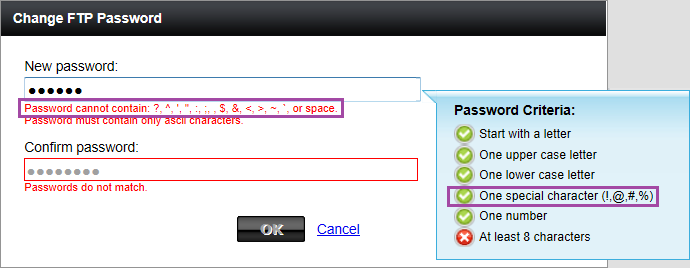
So FTP stopped working for one of the GoDaddy websites I look after. It seems they decided the password didn't comply to their password policy, so they've deactivated it until I update the password. Fair enough. Perhaps.

However, I'm amused by their new password policy regarding special characters.

1. Password must contain special characters.

2. Password cannot contain ?, ^, ', ", :, ;, $, &, <, >, ~, ` or space.


I can't help but think of XKCD 936.


26 October 2011

Enum.GetValues in Silverlight

It seems Enum.GetValues is not defined in the Silverlight client profile.
The owl says it best.
Oh well, a hacking we shall go.

15 October 2011

Why won't my Visual Studio macros run?

OK, so my macros are silently failing to run. Much Googling and experimenting rules out multiple possible options, including:
  • what if macros were disabled in the Visual Studio options?
  • what if I'd somehow corrupted my Visual Studio installation?
  • what if it's a UAC issue on Windows 7?
And more magical possibilities fill the imagination.

No dummy - my macro just has a syntax error in it. (Well, more specifically, I had another test module in the same project, which had a syntax error in it).

Still, it would have been nice if Visual Studio had told me rather than giving me the silent treatment.

P.S. Here's the handy macro I was settings up to allow me to locate an open file in the solution explorer.
P.P.S. Actually remember to press the 'Assign' button when setting up keyboard bindings. Clearly I'm having a dumb day.